Lesson 01Watch now
What Is Optiverse?
My overview of the platform: 14 features, one at a time, what each one does, whether it’s in Starter or Premium, and the brokers Optiverse connects to today.


Optiverse tutorials from Steve Ganz
I beta tested Optiverse before its US launch, and I’m a launch partner. These are my step-by-step Optiverse lessons, from setup and charting to the Scanner, Magnet and GEX, risk and hedging, and using Optiverse with Claude. Start with my code: 37 days of Premium, free.
Steve Ganz is under contract with Optiverse as a beta tester, launch partner and affiliate, and earns a commission when you subscribe with his code. You never pay more than buying direct from Optiverse.
What Optiverse is
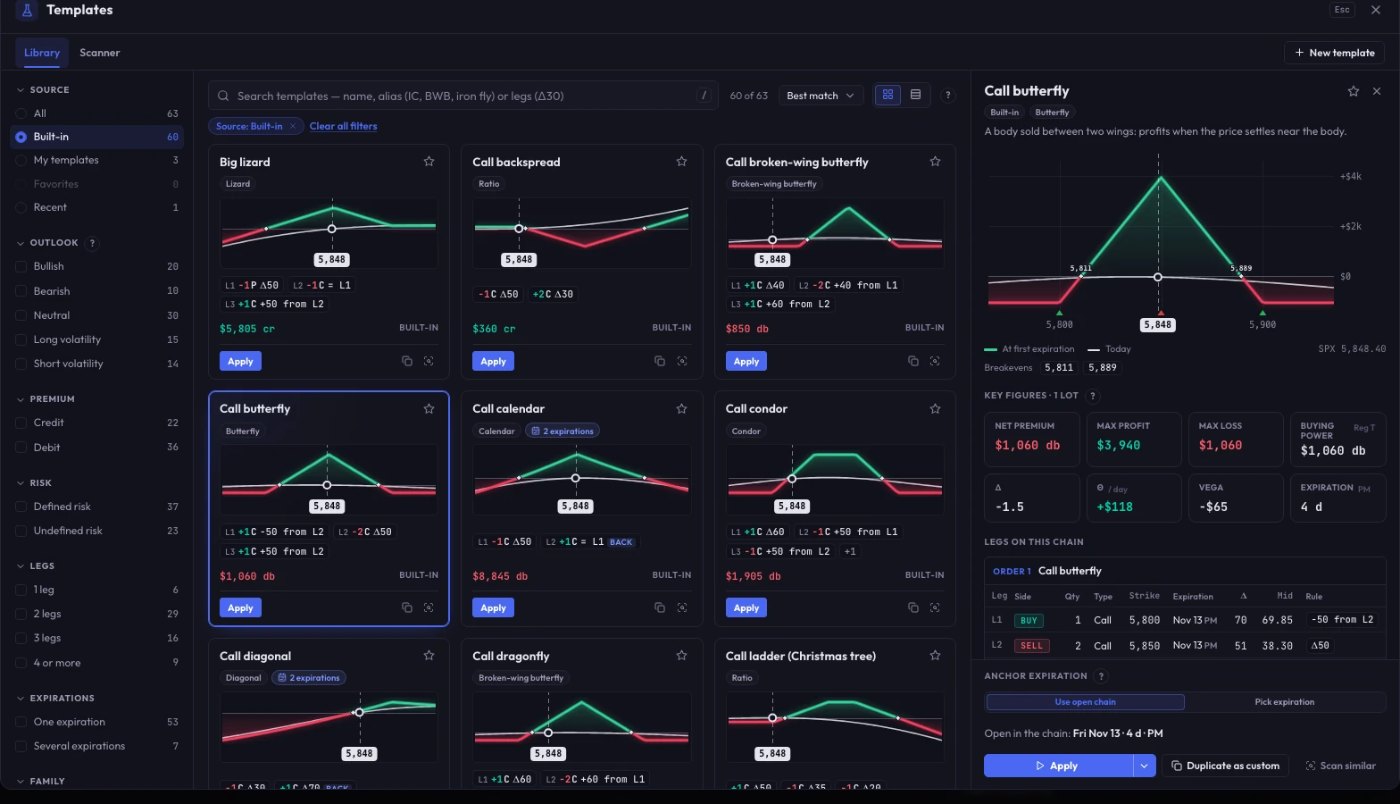
Optiverse is a desktop options platform for Windows and macOS. It connects to Interactive Brokers and tastytrade, with more brokers being added. Building trades, dealer positioning, live position monitoring, portfolio risk and hedging, and a trade journal with replay all run in one workspace, on your broker’s live data.
Build any structure and see its risk profile instantly.
Scan thousands of versions of a trade to find the ones that fit your criteria.
Watch the market and your trades on the same chart.
Mission Control shows every open position on one screen.
See where market makers have to hedge, strike by strike.
Portfolio risk measured by full revaluation, not approximations.
Review every closed trade and replay how it played out.
Ask about your portfolio in plain English.
Send a trade as a code, with no file to pass around.
Features marked Premium are in Optiverse’s Premium plan, which the 37-day trial includes.
Steve’s code
37 days of Optiverse Premium free, no credit card. Optiverse’s standard trial is 7 days. Or, if you’re ready to subscribe, 10% off your first payment. Enter your email and both codes appear instantly, with my Optiverse overview video.
Lessons
Each lesson shows one part of Optiverse on real trade structures. New lessons post here and on my YouTube channel as they’re ready. Lessons marked Premium use features in Optiverse’s Premium plan, which the 37-day trial includes.
Lesson 01Watch now
My overview of the platform: 14 features, one at a time, what each one does, whether it’s in Starter or Premium, and the brokers Optiverse connects to today.
Lesson 02
Install the desktop app on Windows or Mac, connect Interactive Brokers or tastytrade, and start the 37-day trial with the code.
Lesson 03
Star Charts: your strikes, break-evens and payoff drawn right on the price chart, with saved multi-chart layouts.
Lesson 04
Every open position and order on one screen, with a warning when a trade drifts or a short strike is tested.
Lesson 05
Build any structure from the option chain or a template, then read the payoff, break-evens, probability of profit and Greeks before you place it.
Lesson 06
Scan thousands of versions of a trade and rank the ones that fit your rules, for example by time decay per dollar at risk.
Lesson 07
Replay a trade on recorded prices, and split its result into time decay, the price move, implied volatility and trading costs.
Lesson 08
The Flight Log keeps every trade, reconciled with your account, so you can write down the lesson. The Observatory shows what’s working in your trading.
Lesson 09
Gamma exposure by strike and its key levels (Call Wall, Put Wall, Flip Point), and Magnet: how much dealers must buy or sell at each price. It supports decisions; it doesn’t forecast prices.
Lesson 10
Every option repriced across thousands of scenarios, Expected Shortfall with a daily limit, and Hedge Finder to size a hedge to your budget.
Lesson 11
Connect Claude to Optiverse and ask about your portfolio in plain English. Claude can prepare an order, but nothing goes to your broker until you review it and press Send.
Want to watch me use it on my own trades? See the Alert Service → · Optiverse’s own help: YouTube ↗ and the user guide ↗
Questions
Interactive Brokers (through TWS or IB Gateway) and tastytrade. More are being added, starting with Schwab (thinkorswim) and Tradier.
It uses the brokers’ official APIs, never stores your broker password, and never trades on its own or moves funds. Orders go out only when you confirm them. Risk calculations run on your own computer.
Starter covers the trading workspace, charts, Active Trader, order routing and the full journal with replay. Premium adds dealer positioning with Magnet, the portfolio risk engine with hedge proposals, SmartFill, the trade map, replay on recorded prices, P&L attribution and AI assistants. The 37-day trial is Premium.
Enter your email at optionsincomeacademy.com/optiverse/code and both codes appear on the next page, each with a button that opens Optiverse with that code applied. Then create your account.
Both. It’s a desktop app.
Yes. Steve Ganz is under contract with Optiverse as a beta tester, launch partner and affiliate, and earns a commission when you subscribe with his code. You never pay more than buying direct from Optiverse.
Steve Ganz is under contract with Optiverse as a beta tester, launch partner and affiliate, and earns a commission when you subscribe with his code. You never pay more than buying direct from Optiverse.
Educational content only, not financial advice. Options trading involves risk of loss, and past performance does not guarantee future results.